RD System for MT4/MT5

Rd
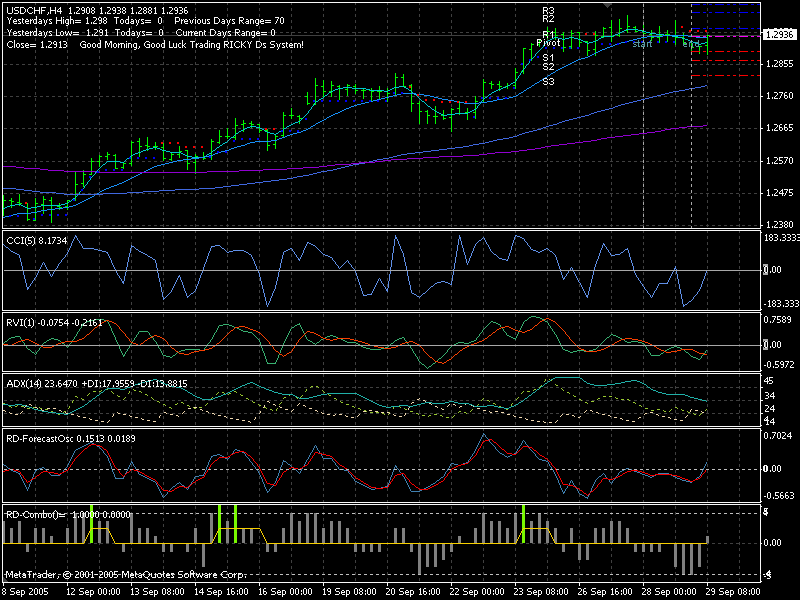
Hi new digital ,Rd system is preety good ,as far as I see,I did use it to trade some times whan I feel lazy to involve whit what so ever the market is heading ,It make money ,have to be patient cos it is to meant to be all good then it generate the signal,what I see the base is ADX ++++ all indi .
Excuse me ,but where can I download them?
Indicators like DVI,RD-FORESCAST, RD-COMBO.
Rd
Excuse me ,but where can I download them? Indicators like DVI,RD-FORESCAST, RD-COMBO.
Hi grunge you can ask Ricky D he is here some where in TSD if you like and he has a new indi too I got some here but didnt know how to sent it to you,cheers Audio
Can't find the indicators. Can someone please link 'em.
RD pivots seem to work well.
Thanks.
Attached
On this link you may find indicators, manual and template.
Forum on trading, automated trading systems and testing trading strategies
forexts19, 2005.09.29 10:18
Some basic indicators, manual and imprivement of the system. Besides, those indicators may be used separatedly from the system for manual trading for example.

Attached
On this link you may find indicators, manual and template.
It is RD_Combo.
Thus we have all the indicators for this system.
And we have manual (instruction) how to use it.
May somebody look at this system?
I should be great system.
I am still busy with testing 20 EAs.
I will join in the beginning of next week this thread and ASCTrend thread as well.
It is RD_Combo.
Thus we have all the indicators for this system.
And we have manual (instruction) how to use it.
May somebody look at this system?
I should be great system.
I am still busy with testing 20 EAs.
I will join in the beginning of next week this thread and ASCTrend thread as well.thanks
newdigital
.
it's a good system.
But most of time i would see the BT signal on 15m-30m map to find the entry/exit.
And use RD plus other indicators such as MACD to determine a trend.
Anybody have experiences trading with RD-system directly ?
thanks
newdigital
.
it's a good system.
But most of time i would see the BT signal on 15m-30m map to find the entry/exit.
And use RD plus other indicators such as MACD to determine a trend.
So ,anybody have experiences trading with RD-system?I tried to use this system on demo some time ago (it is now new system). I do not remember now how it was performing. Just want to finish with Braintrading system finally this week or next week and will join this thread.
thanks
newdigital
.
it's a good system.
But most of time i would see the BT signal on 15m-30m map to find the entry/exit.
And use RD plus other indicators such as MACD to determine a trend.
Anybody have experiences trading with RD-system directly ?YAP it a good system just like any other system it nnet to be passion untill all the indi is in the same bull&bear than it can excecuted

- Free trading apps
- Over 8,000 signals for copying
- Economic news for exploring financial markets
You agree to website policy and terms of use
I found the very interesting trading system here for MT4.
It is particular set of indicators with the great possibility of creating the EAs.
Besides, all those indicators may be used in other trading systems. This RD system was already improved several times. So, you will find the original one with manual, skeleton for EA and template, and one or two improvement.
See in download section.